How to Choose a Booking System for Your Small Business
WebbyBooky · Updated
Choosing an online booking system for small business starts with a practical question: can it handle the way your customers book and your team works? A salon, a tutor and a room-hire business need different booking journeys. This guide explains what to compare, how to budget for growth and why WebbyBooky is worth considering when you want straightforward booking management with a free starting point.
Start with the services your customers actually book
1. Match the booking system to your business
Before comparing features, write down what a customer reserves, who provides it and how long it takes. A useful booking system for small business should make those choices clear. If you offer both services and room hire, check how each workflow is configured rather than assuming every booking type works the same way.
- Appointments with people
- For salons, treatments or private lessons, look for service durations, staff assignments and available appointment times. WebbyBooky has a team members and services booking type.
- Rooms and spaces
- For studios, meeting rooms or rental spaces, look for duration rules and pricing by booking length. WebbyBooky offers a separate room booking type, selected during business setup.
2. Try the booking journey as a customer
Open a sample booking page on your phone. Can you understand the service, see its price and duration, choose a location and find a suitable time? Review the confirmation and any payment instructions too. WebbyBooky provides a client booking portal where customers select the options relevant to your booking type. A clear journey helps customers make a booking without calling you to explain every step.
3. Choose tools that help with the working day
Small business booking software should help after the appointment is made, too. Ask the person who handles reception or scheduling to try a normal working day: find a booking, change a time, check a returning client and review tomorrow’s schedule. WebbyBooky brings these practical tasks into its booking and management features.
- A useful calendar
- Review bookings by staff member or branch and use booking statuses to follow the day.
- Client history
- Keep contact details, preferences and past bookings available for the next visit.
- Flexible services
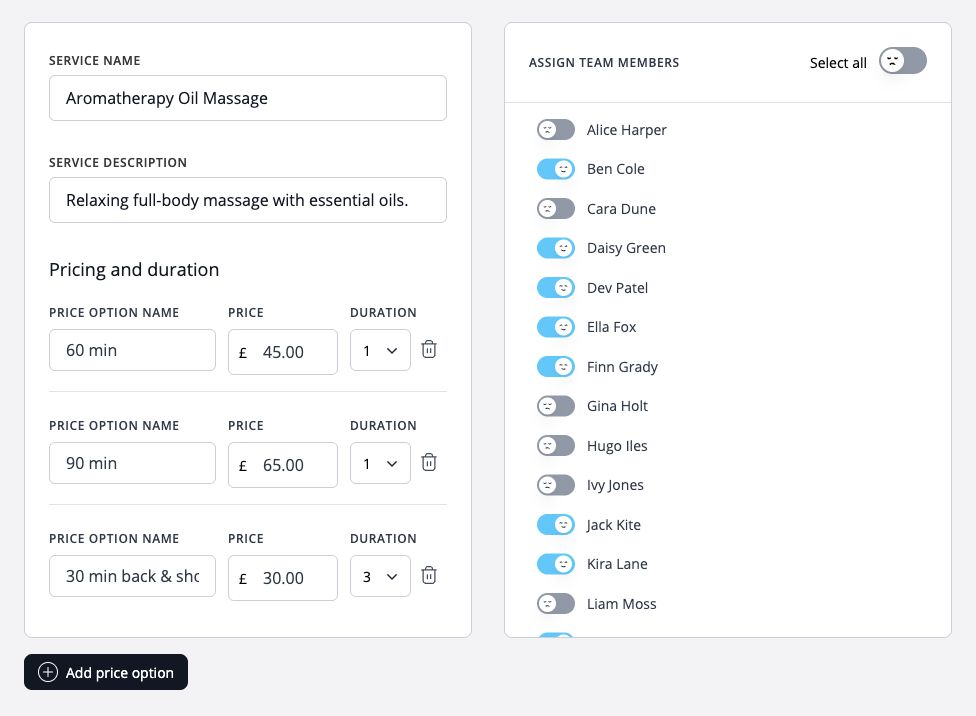
- Set service descriptions, durations and pricing options, then assign the staff who provide them.
- Appropriate access
- Invite administrators and assign permissions for the work they need to do.
4. Compare the total cost as you grow
Compare the bill for your current team and the team you expect to have next. Check whether pricing is per user, per location or a plan with included capacity. Ask about booking limits, SMS charges, payment processing and annual commitments. If a booking tool is already included in software you pay for, consider the additional cost of using it. The lowest advertised price is useful only when the plan covers your actual workflow.
5. Why WebbyBooky is a good choice for small and growing businesses
WebbyBooky is worth considering when you want a free starting point, clear capacity limits and unlimited bookings on every plan. You can begin with a small service menu or room inventory and choose a larger plan as needed. The published plans below include staff and room allowances; choose the appropriate business booking type during setup. Prices are USD per month, with optional SMS billed separately.
- Free · $0.00/month
- Up to 2 team members and 2 rooms, with unlimited bookings.
- BASIC · $5.99/month
- Up to 5 team members and 5 rooms, with unlimited bookings.
- STANDARD · $12.99/month
- Up to 15 team members and 15 rooms, with unlimited bookings.
- PREMIUM · $24.99/month
- Up to 40 team members and 40 rooms, with unlimited bookings.
6. Plan for another location, not just another booking
Growth can mean a new staff member, more services or a second location. WebbyBooky supports multiple branches in one account, with no extra charge for adding branches, and lets you set branch opening hours and switch between branch booking views. Unlimited admin accounts let you give the people managing bookings their own access. Check your staff or room allowance before expanding; adding a branch does not remove the capacity limit of your plan.
7. Check specialist requirements before you commit
A good fit is more important than the longest feature list. If you need class memberships, medical records, specific accounting integrations or complex resource allocation, confirm those requirements directly before choosing any platform. For deposits or full payments, check the supported payment setup, countries and fees; do not assume every payment method is available for every business. WebbyBooky is a strong candidate for straightforward service appointments or room reservations, but your essential requirements should decide the shortlist.
8. Start small and rehearse a real working day
Use WebbyBooky Free to set up a small version of your business without entering a credit card. Add your real service names or room details, working hours and prices. Make a sample booking, change its time and check that the people managing it can find the information they need. Only share the booking page widely once both the customer journey and your daily workflow make sense. Choose a paid plan when you need more capacity.
Worked example
From two practitioners to a growing team
A two-person massage business could begin on Free with three clearly described treatments. When a third practitioner joins, BASIC provides room to grow to 5 team members for $5.99/month. If the business later opens another branch, it can manage that location in the same account while staying within the plan’s total allowance. This is a capacity example, not a promise that every business needs the same setup.
Illustrative setup, not a live booking or customer result. Adapt the names, times and prices to your business.
Your small business booking system checklist
- Choose the right workflow: staff appointments, room reservations or separately configured booking types.
- Try the customer booking journey on a phone and the admin workflow with your team.
- Compare costs at your current size and your next stage, including optional fees.
- Confirm how staff, rooms, branches and admin accounts count towards plan limits.
- Check essential integrations and payment requirements before committing.
- Start with a manageable setup and keep service details and availability current.
Next steps for your business
Explore the related features
- Booking calendar
- Online booking portal
- Service and pricing management
- Client management
- Admin permissions